SuperSeller Blog
WooCommerce AI Chatbot Test: 10 Questions to Ask Before Going Live
A convincing first answer is easy. The harder test is whether a chatbot handles variants, missing facts, policy questions, and a change of topic without making things up.
Before you put a WooCommerce AI chatbot in front of shoppers, give it questions that your catalog can answer, questions it should refuse to guess, and one question that changes the subject. Ten well-chosen prompts will tell you more than a polished welcome message.
This is a test plan from the SuperSeller team. The first three examples below link to our recorded sample-store test; the other seven are questions for you to run against your own products and policies. They are not claimed as passed SuperSeller tests. Our demo contains sample products and does not accept orders.
Prepare the sources before testing
Choose a small set of products that represent the difficult parts of your store: at least one variable product, one item with a meaningful specification, and one pair shoppers often compare. Save the product URLs and the exact values you expect to see. WooCommerce attributes and variations can carry size, color, price and stock details; check the values in your own product editor before asking the assistant to use them. WooCommerce's variable-product guide explains where those fields live.
Add current shipping, returns and warranty pages if you want the chatbot to answer policy questions. In SuperSeller, select the information for the knowledge base and check that the initial product import has completed before you judge an answer. A failed sync is a setup issue, not proof that the chatbot reasoned badly. The WooCommerce setup guide walks through the connection; the WordPress plugin listing describes the optional widget and separate product and knowledge controls.
Use one scorecard for every answer
For each prompt, write down the source URL or product record, the returned product link, the claim you checked, and a verdict: supported, incomplete, or unsupported. Mark a response supported only when its important claims match the source and it gives the shopper a useful next step. Mark it incomplete if it asks for missing details or hands off appropriately. Mark it unsupported if it invents a price, specification, compatibility rule or policy.
I would keep the exact conversation transcript for a failure. A follow-up can change the answer, so a screenshot of only the last message may hide the cause. Test with the same catalog state and note the date when checking stock or sale prices.
1. Can it find a product within a budget?
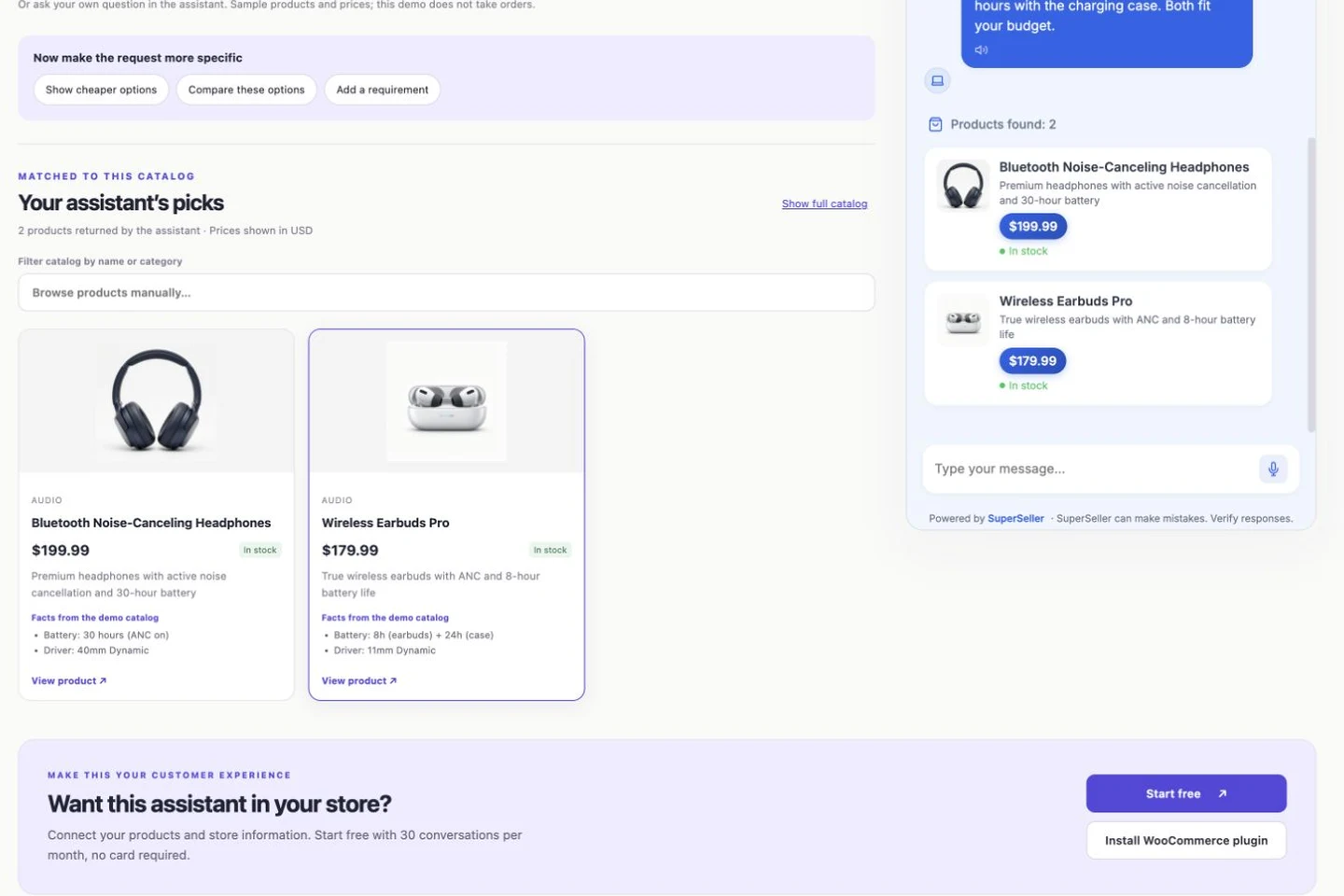
Ask, "Find [product type] under [amount]." Pick a category with two or three genuine matches. Check every returned card for price, currency, availability and a working link. Our sample-store walkthrough includes the exact headphone-under-$200 prompt and product records. That example shows the method, not a result for your catalog.
2. Does a follow-up narrow the shortlist?
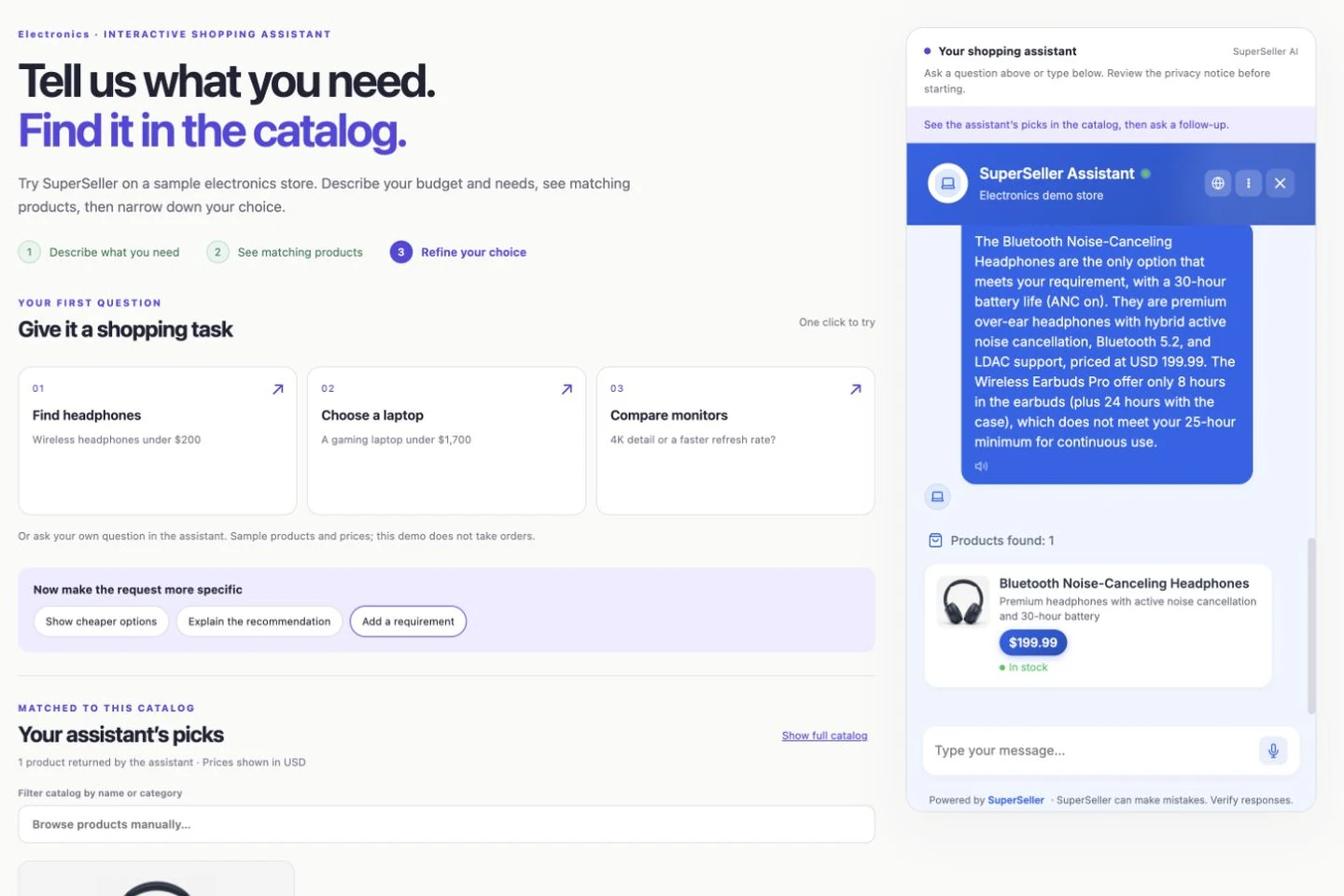
Keep the same conversation and add a requirement that one candidate fails: battery life, dimensions, material, or a connector. The answer should change the shortlist and explain the source field behind the change. In our recorded headphone follow-up, "at least 25 hours of battery life" separates continuous listening time from charging-case capacity. This is the kind of distinction a simple category match can miss.
3. Can it compare two named products without inventing specifications?
Ask it to compare two products by name. Check the differences it reports against both product pages. A comparison should distinguish "the catalog does not say" from "the feature is absent." Our monitor comparison found a missing-specification problem in one follow-up; that is exactly why this prompt belongs in a launch check.
4. What happens when a shopper asks for a size or variation?
Use a real variable product: "Is the [model] available in [size/color]?" Look at the variation, not only its parent product. WooCommerce lets each variation have its own price and stock status. If that detail is not present in the synced source, the chatbot should say it cannot confirm and link to the product page instead of asserting availability.
5. Does it have evidence for compatibility?
Try "Will [accessory] fit [specific model]?" Choose a pair where the compatibility rule is explicitly documented, then another where it is not. A matching category is not enough to promise that a part fits. For the undocumented pair, a useful answer points to the source gap or asks the shopper to confirm with the store.
6. Is a stock answer current?
Ask about an item whose availability you can verify in WooCommerce. Check when the product was last synced, including any variation-level change. Do not score a fluent "in stock" as supported if the underlying stock changed after the assistant's data was refreshed. Stock is a dated fact, not a guarantee that an item has been reserved.
7. Does it use the right shipping policy?
Ask "Do you ship [product] to [destination], and how long does it take?" Give a specific country or region. Compare the answer with the published shipping page, including exclusions. A domestic delivery window should not become an international promise. If the policy lacks the destination, an honest answer says so.
8. Can it answer a returns or warranty question?
Use a real edge case, such as an opened item, a sale item, or a product category with an exception. Check whether the answer cites the applicable store policy and whether its timing and conditions match. If you have not supplied a current policy, the assistant should direct the shopper to support rather than invent one.
9. Does it admit a missing specification?
Ask for a detail that the product record does not contain: a port, ingredient, dimension or certification. This is the deliberate uncertainty test. An incomplete answer that says the detail is unavailable is safer than a confident fabrication. Add the missing fact to the source only when you can verify it.
10. Can it change topics cleanly?
After the budget and follow-up questions, ask about a different named product or category. Confirm that the new answer uses the new product records and links. Our sample-store sequence once reused the previous headphone results for a monitor question; we corrected that behavior and kept the topic-switch test in the checklist.
Decide what to fix before launch
Do not average ten questions into a reassuring score if one wrong answer could mislead a buyer. Fix unsupported claims first. If a source is stale or absent, update the WooCommerce product or knowledge article, wait for the sync, then repeat the exact prompt. If the source is correct but the answer is wrong, save the transcript and product URL so the behavior can be investigated.
Review the live widget only after the catalog and policy checks make sense. SuperSeller's storefront widget is optional; you can inspect the dashboard and test with your own data before publishing it. After launch, keep checking real shopper questions because a prelaunch checklist covers only the cases you chose.
Questions merchants ask before testing
How many questions should I test before enabling a WooCommerce chatbot?
Start with these ten, then add the questions shoppers already send your team. Repeat failed cases after changing the data or setup. The goal is to expose gaps before customers do.
Can I test SuperSeller before showing its widget to shoppers?
Yes. Connect the catalog, review the synced product and knowledge records, and test answers in the dashboard. The widget has its own optional setting in the WooCommerce plugin.
Does this checklist guarantee correct answers?
No. It is a small launch check. Catalogs and policies change, and a passing answer today cannot guarantee the next shopper's question. Keep a human route for uncertain answers.
Run the test with your own store. Install the SuperSeller WooCommerce plugin, then create a Free account and follow the setup guide. The Free plan includes 30 conversations per month for one company without a card.