SuperSeller Blog
AI Product Search in Practice: A Budget, Two Matches, One Better Question
Two headphones fit the budget. Only one meets the battery requirement. A recorded sample-store walkthrough shows what a useful follow-up actually changes.
A product recommendation is only useful if the shopper can check why it fits. We tested a budget question, a battery requirement, and a named-product comparison in our electronics demo. Here are the prompts, the returned products, and the details worth checking.
Test scope: SuperSeller Team, September 9, 2026. This is our own public sample store, not a customer case study. Its 50 sample products do not represent items we sell. The screenshots show live software responses; the videos use edited captures with narration. We did not measure sales uplift, customer satisfaction, or hardware performance.
Start with a budget the catalog can answer
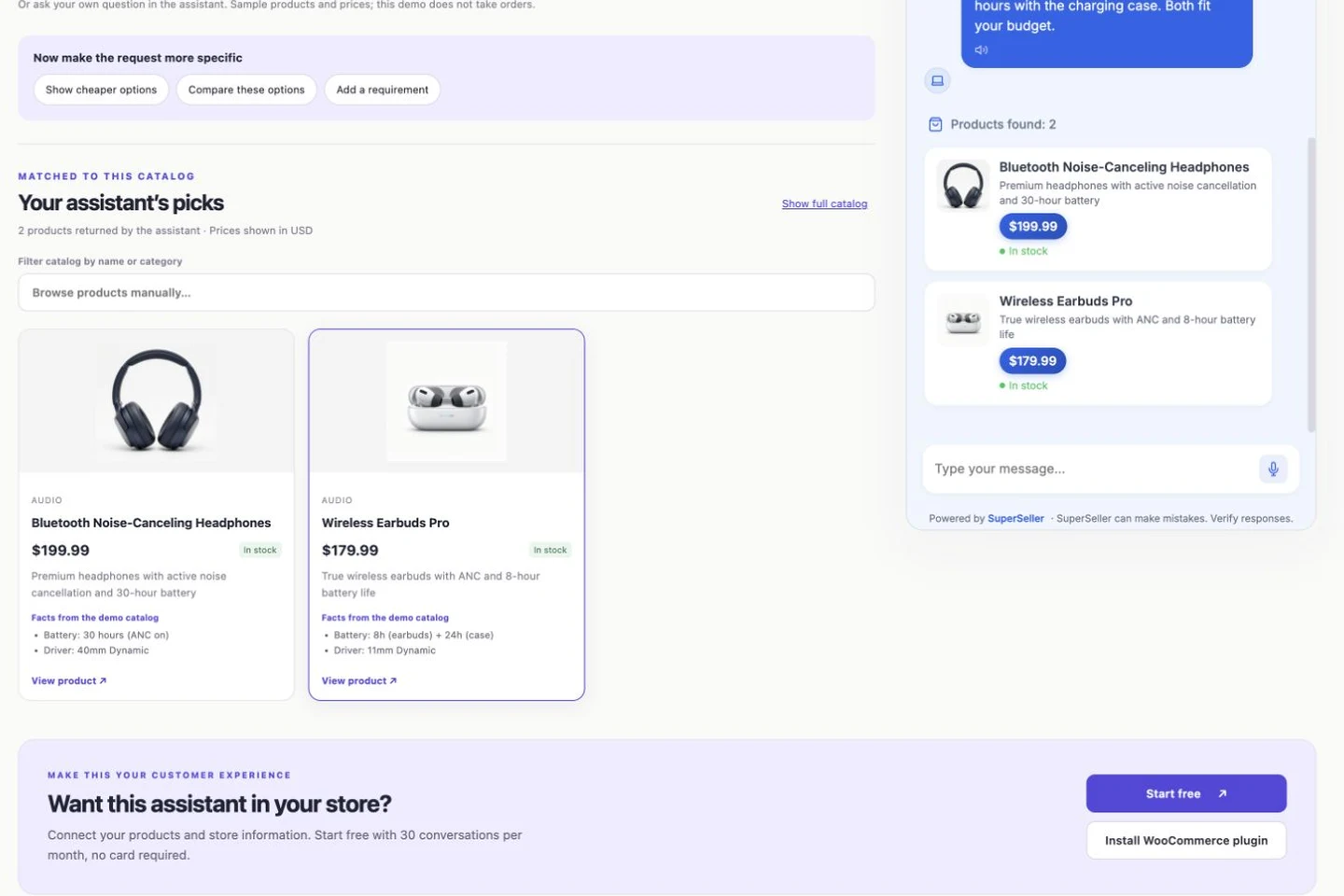
We entered “Find wireless headphones under $200.” The assistant returned Bluetooth Noise-Canceling Headphones at USD 199.99 and Wireless Earbuds Pro at USD 179.99. Both products were marked in stock in the sample catalog. Clicking a product opens its corresponding demo product page.
The useful behavior is not merely mentioning two product names. The cards connect the answer to specific catalog records. The page also narrows its product grid to those matches. That gives the shopper somewhere to check the description, price, and specifications before asking another question.
There is a boundary here: these are prices and stock values in a demonstration dataset. A merchant needs to keep the actual catalog synchronized. A fluent answer cannot make an outdated stock count current, and a product card should never be treated as an inventory reservation.
Add the requirement that changes the shortlist
Our next message was “I need at least 25 hours of battery life.” The two initially suitable products were no longer equivalent. The headphones list 30 hours with active noise cancellation on. The earbuds list 8 hours in the earbuds plus another 24 hours supplied by the charging case.
The assistant kept the headphones and explained why the earbuds do not meet a requirement for continuous listening on a single charge. Adding the case capacity gives a larger total, but it does not turn an eight-hour listening session into a 32-hour one. This distinction is exactly the sort of detail that a broad category filter can leave to the shopper.
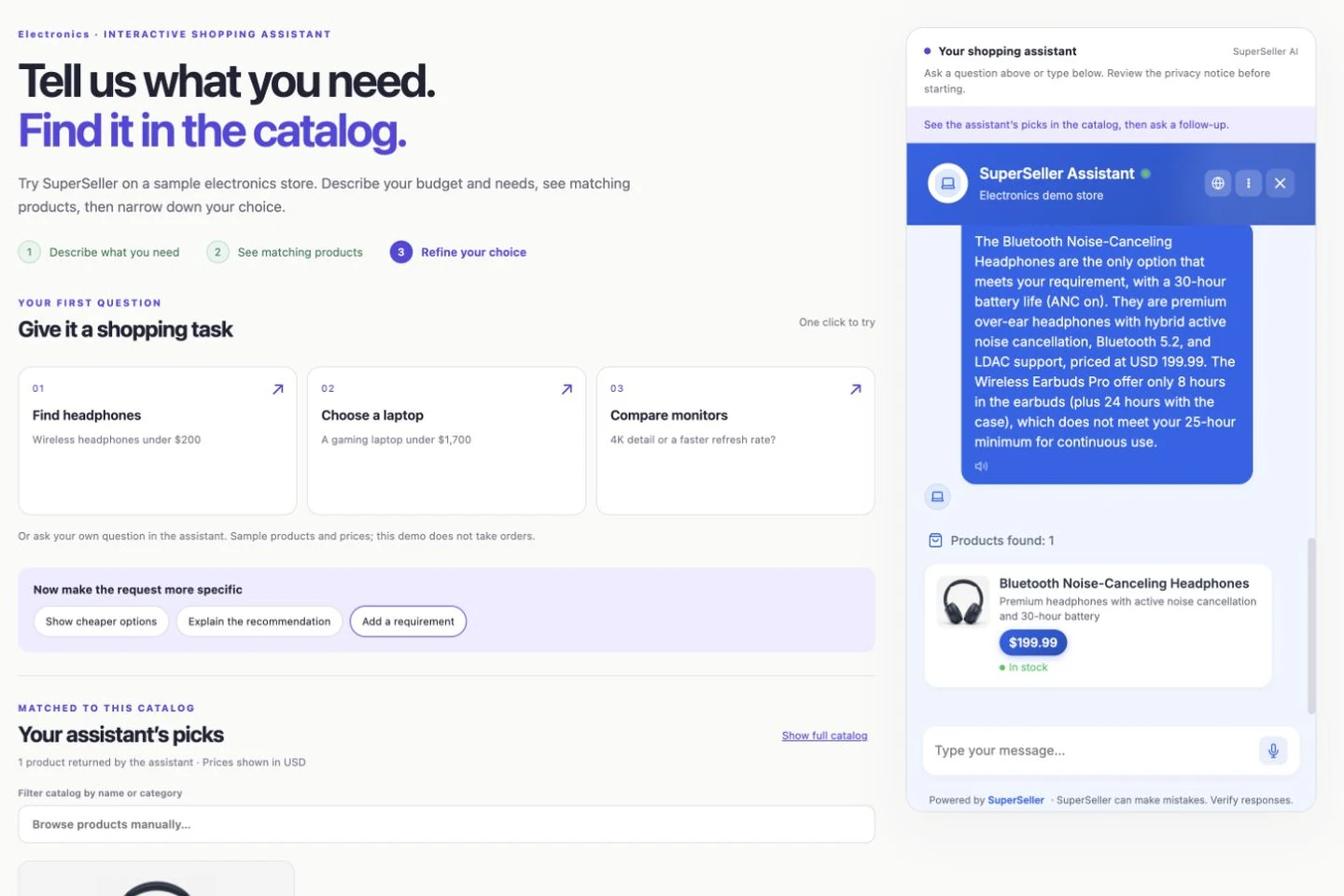
The original question was ambiguous about what “battery life” meant. The follow-up answer made its interpretation explicit. In your own tests, add phrases such as “without recharging” or “with noise cancellation enabled” when those conditions matter. You should be able to trace the explanation back to a product field.
Compare two named products, with the numbers beside you
We also asked the assistant to compare the 4K Ultra HD Monitor 27 and Curved Gaming Monitor 32. The first sample record lists a 27-inch IPS display, 3840 × 2160 resolution, a 144 Hz refresh rate, and USB-C connectivity, priced at USD 449.99. The second lists a curved ultrawide display, 3440 × 1440 resolution, and 240 Hz, priced at USD 599.99.
The response brought those differences into one explanation. This is useful for deciding what to inspect next: a USB-C connection, more vertical pixels, a wider display, or a faster listed refresh rate. It does not establish real-world color accuracy, response-time behavior, or compatibility with a particular laptop. Those need their own evidence.
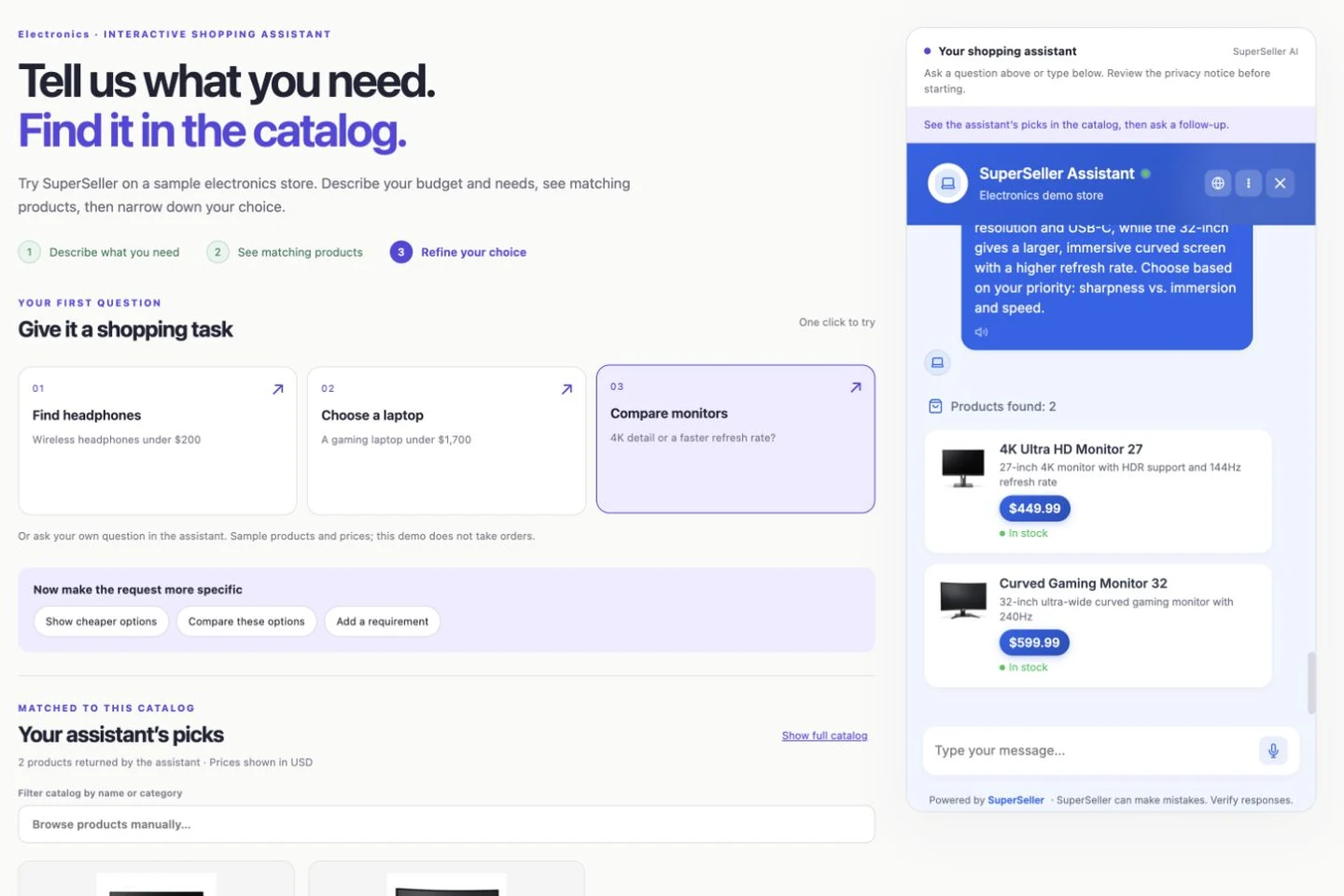
For a practical follow-up, ask which monitor explicitly lists USB-C. In one follow-up test, the assistant selected the documented USB-C model correctly but also claimed ports for the other model that were not present in its source record. We tightened the missing-specification instruction after that result. This remains a reason to check answers against the source, rather than treating a fluent comparison as a verified hardware review. Avoid treating an omitted specification as proof that a feature is absent; sometimes the product data simply does not say. A responsible answer should make that uncertainty visible.
What our testing caught
Testing the complete sequence revealed two defects that isolated screenshots would have missed. Some cards lacked their store currency and displayed a euro fallback even though this catalog uses USD. Also, switching from headphones to explicitly named monitors could reuse the previous headphone results instead of searching again. We corrected currency propagation and added a check that sends newly named products through a fresh catalog search.
These were functional issues, not copy changes. They are why a demo should be tested as a conversation: a correct first answer does not prove that a second topic, a stricter requirement, or the final product card will be correct. If you reproduce a different result, keep the exact query, the relevant product record, and the previous messages together when reporting it.
Repeat the test with your WooCommerce store
- Follow the WooCommerce installation guide and synchronize your catalog.
- Choose a category with meaningful attributes, such as battery life, dimensions, material, or connector type.
- Ask a budget question. Check each returned product against its source record.
- Add one requirement that should remove at least one candidate.
- Switch to a different named product. Confirm that the conversation finds the new item.
- Ask for something the catalog does not document. Check that the assistant does not invent the missing specification.
Start with ten representative questions and record the products returned, incorrect claims, and cases needing human help. Count a useful result when the answer is supported and helps the shopper take a next step. A longer answer or more product cards is not automatically a better result.
The Free plan includes 30 conversations per month, with no card required. A small test is a sensible use of that allowance. For installation details, the published WooCommerce plugin and our guide are the starting points.
Questions before you try it
Is this a real customer store?
No. It is our public demonstration store, with sample products and prices. The assistant responses and product links shown here came from live tests of SuperSeller. The demo does not accept orders.
Can I try product search with a free WooCommerce chatbot?
SuperSeller offers 30 conversations per month on its Free plan, with no card required. Connect the WooCommerce plugin and sync your own catalog before testing product recommendations.
Does a catalog comparison prove which product performs better?
No. It compares the specifications supplied by the store. It is not a laboratory benchmark, a hands-on hardware review, or a guarantee that every specification is correct.
Watch all six short demonstrations, including the Free WooCommerce starting point.
Try the exact questions in the electronics demo, then test the same pattern with your own catalog.