SuperSeller Blog
A Multilingual Store Chatbot Test: Spanish Product Search and Delivery Questions
The reply can change language while product names stay intact. Delivery answers need a destination and a real policy. A recorded test shows both boundaries.
A shopper should be able to ask a simple question in a language they understand. But changing the language does not change the product facts, the store currency, or the places a merchant ships to. We tested those boundaries in our public electronics demo.
Recorded September 9, 2026 by the SuperSeller Team. This is our own sample store, not a customer deployment. Products and shipping rules are demonstration data. The examples below describe observed responses, not a promise of perfect translation across every language or every question.
Choose Spanish, then ask a specific question
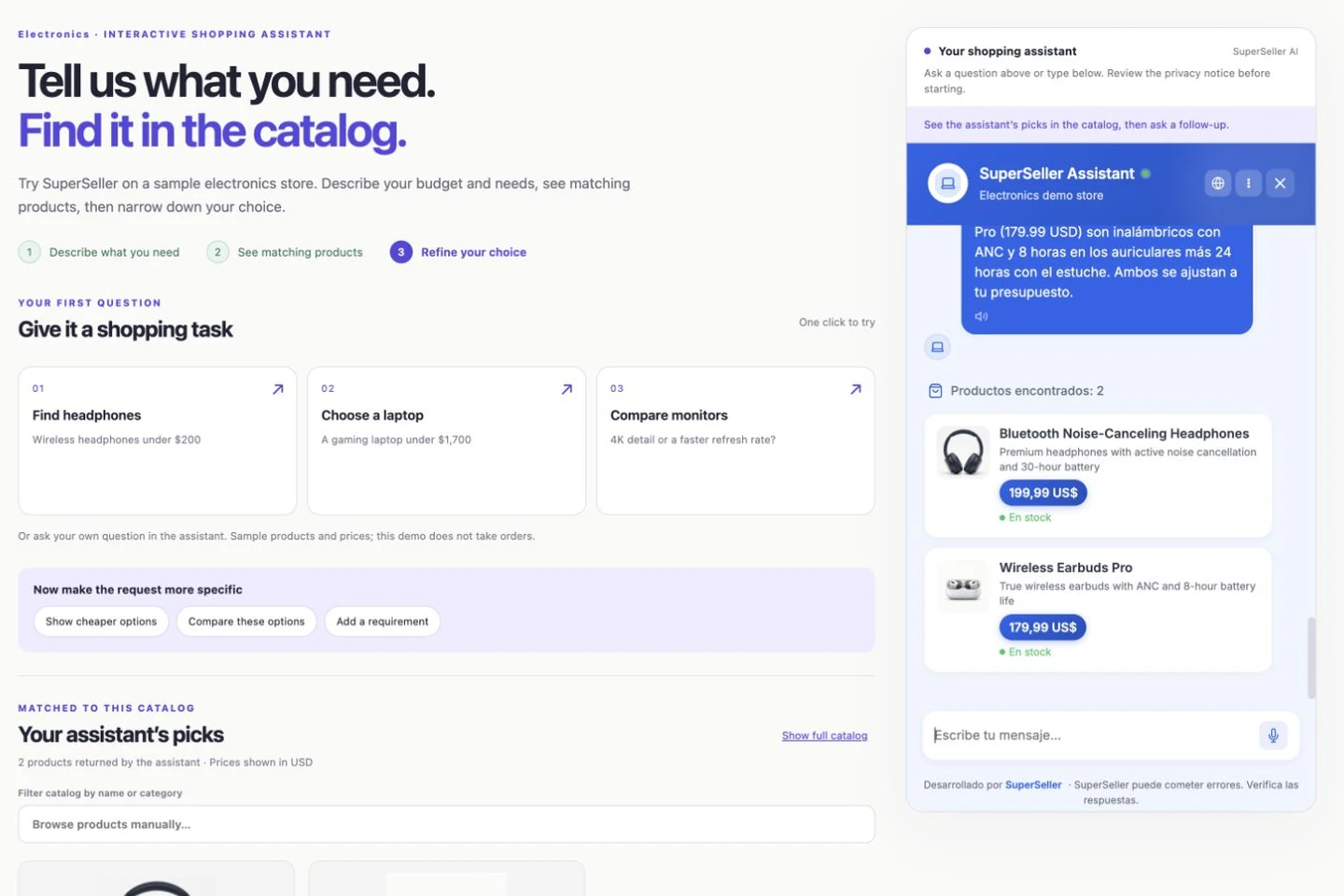
We opened the widget’s language menu, selected Español, and asked: “Busca auriculares inalámbricos por menos de 200 dólares. Responde en español, por favor.” This requests wireless headphones for less than 200 dollars.
The assistant explained two matching options in Spanish. It described noise cancellation and battery details for Bluetooth Noise-Canceling Headphones and Wireless Earbuds Pro. The product names stayed in English, as they appear in the underlying catalog, and the cards linked to the same demo product pages used in the English test.
The widget controls also changed. The input placeholder became “Escribe tu mensaje...” and the product-results heading became “Productos encontrados.” Existing conversation messages were not retroactively rewritten. That distinction matters when you test language switching halfway through a conversation.
Check facts separately from fluency
A fluent sentence can still misstate a product. In our sample data, the headphones list 30 hours of battery life with noise cancellation enabled. The earbuds list 8 hours plus 24 more from the case. The Spanish explanation preserved that distinction. The budget and battery walkthrough shows why it matters for a follow-up requirement.
For your store, check measurements, compatibility terms, decimal separators, and currency symbols. Translating “dollars” into another language should not convert a USD price into a EUR price. Keep the product page available as a reference, especially when a shopper uses a translated category name that differs from your merchandising language.
Do not score the entire experience from one language example. Ask someone fluent in the language to review a small set of real shopping questions. Include colloquial wording, an ambiguous term, and a request involving a precise technical constraint. The test shown here demonstrates Spanish behavior on these inputs; it does not validate every locale.
A delivery answer needs a region and a source
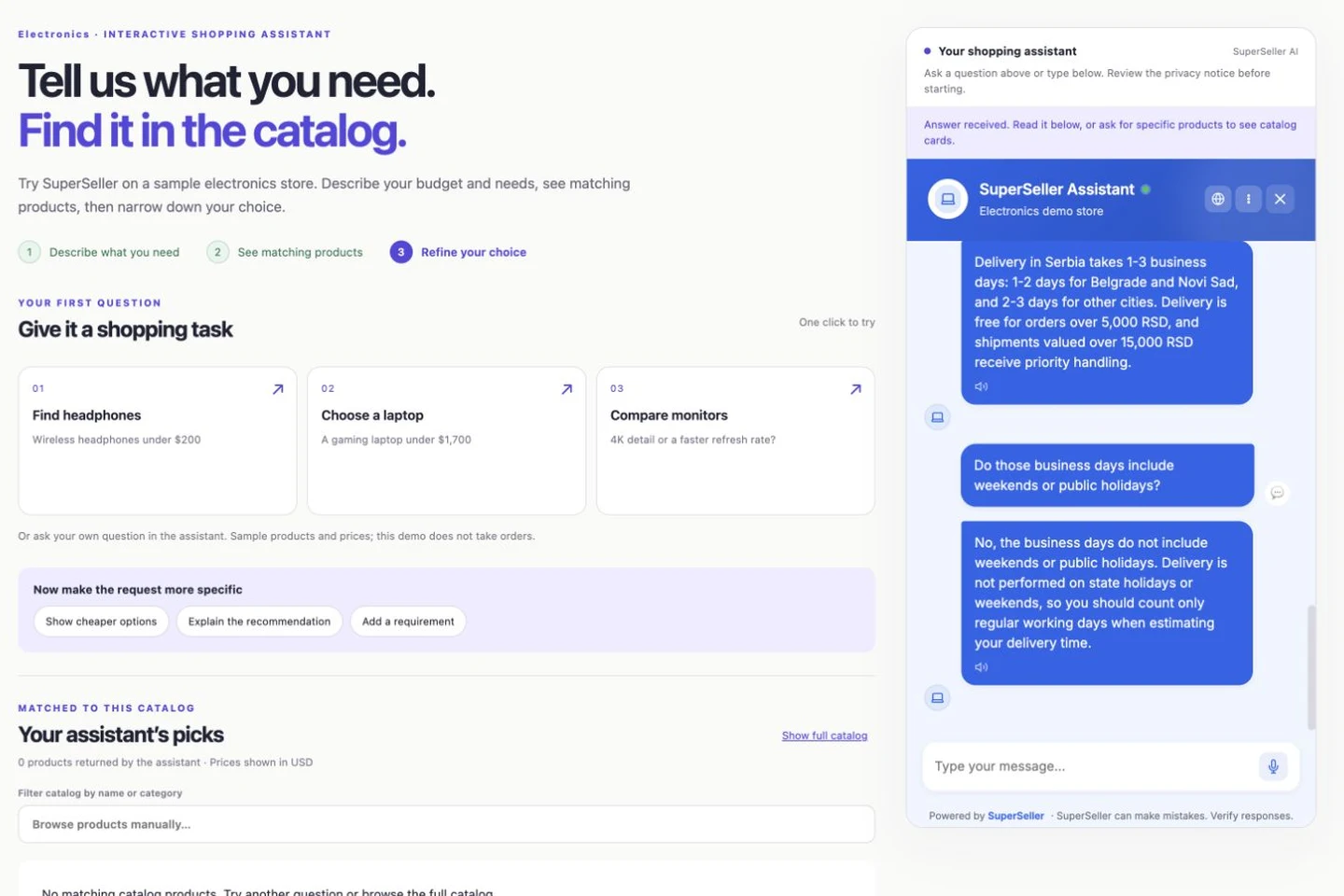
We also asked about delivery times and shipping costs. The configured demo knowledge base contains a policy for Serbia, written in Serbian. Its delivery window is one to three business days; it excludes weekends and public holidays. The assistant summarized those conditions in English.
For the short demonstration we narrowed the question to delivery in Serbia, keeping the regional scope explicit. A merchant should do the same in a policy document: name the destinations, the business-day definition, any order cutoff, and the exceptions. “Delivery in 1–3 days” without that context can sound like a promise the store never intended to make.
What this demonstration does not establish
The demo uses USD catalog prices, while the sample Serbian policy contains RSD fee thresholds. We do not use that mixture to quote an order total or imply a currency conversion. Before a real launch, align the policy currency with the checkout rules and state any destination-specific fees explicitly.
Nor does this test establish an arrival date for a particular parcel. A policy answer is separate from order or shipment tracking. Without a verified shipment lookup, the assistant should not claim that an order has been dispatched, is delayed, or will arrive tomorrow.
We did not validate international delivery, courier service levels, or a real checkout shipment in this sample store. If the knowledge base does not cover a destination, the next step is clarification or support, not extending a domestic policy to that country.
Prepare your store information before the first shopper asks
- Write a shipping page with regions, working-day windows, fees, exceptions, and a contact route.
- Connect the relevant content to your assistant’s knowledge base and remove obsolete or conflicting versions.
- Check a domestic question, an international question, and one the policy cannot answer.
- Repeat those questions in your main shopper languages.
- Verify links, numbers, currency, and how the assistant handles uncertainty.
- Re-run the same questions after changing a policy. Saving new text is not proof that the next answer uses it.
For a WooCommerce installation, start with the setup guide and product-sync documentation. Product data and policy knowledge serve different purposes: syncing items does not automatically document your delivery conditions.
Keep a small, repeatable language checklist
A useful test record has four fields: exact question, selected language, source fact, and observed answer. Add a screenshot when the controls or formatting matter. A reviewer should be able to distinguish a mistranslation from missing product data or an unclear policy without guessing what was asked.
Test the visible interface as well as the answer: language menu, history, new chat, support options, and error messages. Changing future replies is only part of a multilingual experience. The surrounding website may need its own translations; selecting Spanish inside the widget does not translate the demo page.
Questions before you try it
Does choosing a language translate the entire store?
No. In this test, selecting Spanish changed the widget interface and future assistant replies. The surrounding demo page and original product names remained in English.
Does a shipping-policy answer track an order?
No. A policy describes a delivery window and conditions. It does not show the current location or status of a specific shipment.
What should I do when the policy does not cover a destination?
Add a current policy for that destination or have the shopper contact support. Do not turn a domestic delivery window into an international delivery promise.
Watch all six short demonstrations, including the Free WooCommerce starting point.
Open the demo and try a language. To evaluate it with your own store, start Free with 30 conversations per month and no card required.